Text to Morse Code: Step-by-Step Guide
Accurate International Morse takes more than a lookup table. Follow this encoder workflow — spacing, WPM, WAV export, and browser privacy — from start to finish.
From Plain Text to Accurate Morse
Converting text to Morse looks trivial until the output lands on paper with wrong spacing, American Morse ambiguities, or speed that no human keyer could sustain. A reliable encoder workflow follows ITU-R M.1677-1 timing, respects word boundaries, and produces audio you can actually copy by ear — not just dots on a screen.
This step-by-step guide walks through the encoder on /text-to-morse and the main translator. Whether you are preparing a scout demo, checking homework, or building ear training files, the same rules apply.
Step 1 — Prepare Your Input Text
International Morse covers A–Z, digits 0–9, and common punctuation. Before encoding:
- Convert to uppercase (encoders typically normalize case)
- Replace curly apostrophes and smart quotes with straight ASCII
- Remove unsupported symbols or expect
#placeholders in output - Decide word boundaries — hyphenated words may encode as one unit or two per your convention
Step 2 — Encode Letter by Letter
Each character maps to a unique pattern. Example encoding of CAT:
| Letter | Morse | Element count |
|---|---|---|
| C | -.-. | 4 elements |
| A | .- | 3 elements |
| T | - | 1 element |
Combined with standard spacing: -.-. .- -. The encoder handles lookup; your job is verifying output against the alphabet chart until patterns become automatic.
Step 3 — Apply Spacing Rules
Spacing is not decorative — it separates words and letters for the decoder's ear:
- Between elements within one character: 1 dot unit
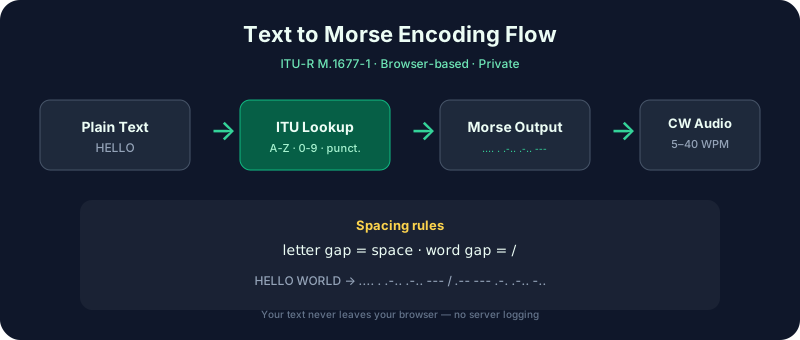
- Between letters in one word: 3 dot units (shown as a space in text)
- Between words: 7 dot units (shown as
/)
Example sentence GO NOW:
--. --- / -. --- .--
Common encoder mistake: collapsing word gaps to a single space. Always confirm slashes appear between words in long messages.
Step 4 — Set WPM and Farnsworth
Words per minute sets dot length: one dot = 1.2 ÷ WPM seconds. Everything else scales from that unit.
Choosing speed
- 8–10 WPM — Beginner ear training and classroom demos
- 13–15 WPM — Typical rag-chew on-air pace
- 20+ WPM — Contester territory; verify you can copy before encoding practice files this fast
Farnsworth spacing
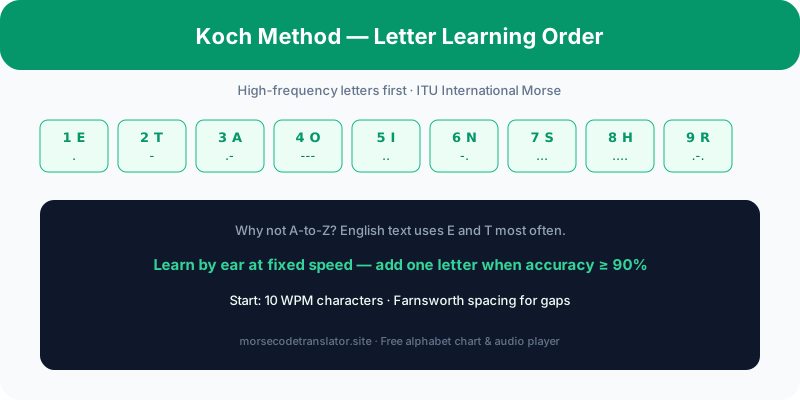
Enable Farnsworth in Advanced settings to send characters at one speed and stretch inter-character gaps toward a higher effective word speed. Koch learners use 10 WPM characters with 15 WPM gaps — the standard Farnsworth beginner preset described on /learn.
Step 5 — Play, Verify, and Export WAV
After encoding:
- Press Play and listen with eyes closed — can you copy it back?
- Open /morse-to-text and decode from the printed dot-dash string to confirm round-trip accuracy
- Adjust pitch (400–800 Hz typical) for comfortable listening on your speakers
- Click WAV export to save an offline drill file for commutes or classroom playback
Privacy — Why Browser-Only Matters
Many online converters upload your text to a remote API. That is unacceptable when practicing call signs, exam answers, or personal messages. morsecodetranslator.site runs translation logic entirely in JavaScript inside your browser tab — no server round-trip for encode/decode, no account required, no pop-up ads hijacking focus mid-session.
Verify this yourself: disconnect from the network after the page loads; encoding and playback still work for standard characters. That offline capability makes the tool safe for field exercises and privacy-conscious clubs.
Advanced Encoder Workflow
Once basics are solid, extend your pipeline:
- Batch-encode QSO templates from /morse-code-phrases and save WAV sets per week
- Mix letters and digits using the numbers chart at /morse-code-numbers
- Use the audio player for speed drills separate from encoding sessions
- Compare sine vs square waveforms in Advanced settings — some ears prefer softer sine tones for long sessions
| Task | Recommended WPM | Export? |
|---|---|---|
| First lesson | 8 WPM, Farnsworth 12 | No — listen live |
| Weekly drill pack | 10 WPM | Yes — WAV per day |
| Pre-QSO rehearsal | Your on-air speed | Optional |
| Contest prep | 20+ WPM | Yes — short bursts |
Put the Workflow on Repeat
Text-to-Morse is a craft step, not a novelty button. Prepare text, encode with ITU spacing, set honest WPM, listen, export if needed, round-trip verify. Ten minutes daily through this pipeline builds the same muscle memory as sending on a key — without burning transmitter hours. Open /text-to-morse, type your first name, and hear it done right.
Troubleshooting common encoder output
If output looks wrong, check these before blaming the tool: unsupported characters become #; double spaces create extra word gaps; lowercase input may normalize differently than expected. Emoji and accented letters often fall outside ITU International Morse — transliterate manually before encoding (e.g., replace é with E). For exam-style drills, stick to A–Z, 0–9, and basic punctuation.
Character sets beyond English
International Morse includes accented Latin letters and shared prosigns used across languages. If you encode non-English call signs or place names, verify each special character against the alphabet reference — German operators use umlaut conventions, French nets use distinct prosign habits. The encoder handles standard ITU mappings; regional on-air customs still require listening time on band.
Integrating encoder practice with decoding
Split sessions: first half encode familiar phrases, second half decode random groups on /morse-to-text without looking at the encoder output. Bidirectional fluency separates operators who recognize their own callsign from those who freeze when a net control sends a unexpected handle. Five minutes each direction daily is enough when sustained over a month.
WPM math for instructors
At 10 WPM, one dot lasts 0.12 seconds; dash 0.36 seconds; letter gap 0.36 seconds; word gap 0.84 seconds. Classroom demos benefit from projecting these numbers while students listen — connecting formula to sensation prevents the myth that speed is arbitrary. At 20 WPM, dot length halves; gaps shrink proportionally. Encoders handle arithmetic; humans learn by ear first, then confirm with timing tables on /learn.
Batch workflows for clubs
Club instructors export weekly WAV packs from identical phrase lists so members drill the same content at home. Standardize on one WPM per month — January at eight, February at ten — so net practice aligns. Browser-only encoding means no member submits personal text to a server; privacy matters when drills include real call signs.
From encoder to hand key
Software encoding builds timing expectations; a straight key or paddle builds sending muscle. Transition by encoding a phrase, listening, then sending the same phrase on sidetone while comparing rhythm. Gaps matter as much as dits — beginners rush inter-letter spacing first. The encoder remains the reference truth when your fist wavers.
Mobile and offline use
Load /text-to-morse once on Wi-Fi; subsequent encoding works offline because logic runs client-side. Commuters can export WAV files at home and listen without signal. Teachers in classrooms with restricted networks appreciate the same property — no API keys, no student accounts, no data leaving the device for standard encode operations.
Quality checklist before sharing audio
Before posting encoded audio publicly or playing it in a club demo: confirm word slashes present, verify WPM matches announced speed, listen once eyes-closed for rushed gaps, and credit ITU International Morse when audiences might confuse with American railroad variants. Small quality habits prevent misinformation from spreading with good intentions.
Return to this workflow whenever speed increases — what worked at ten WPM may hide spacing errors that become obvious at eighteen. Re-encode old phrases at new speeds monthly as a regression test.
Frequently Asked Questions
How do I convert text to Morse code online?
What spacing should I use between words?
/) between words. Example: HI THERE → .... .. / - .... . .-. .